Remove metadata associated with a digital image with Microsoft
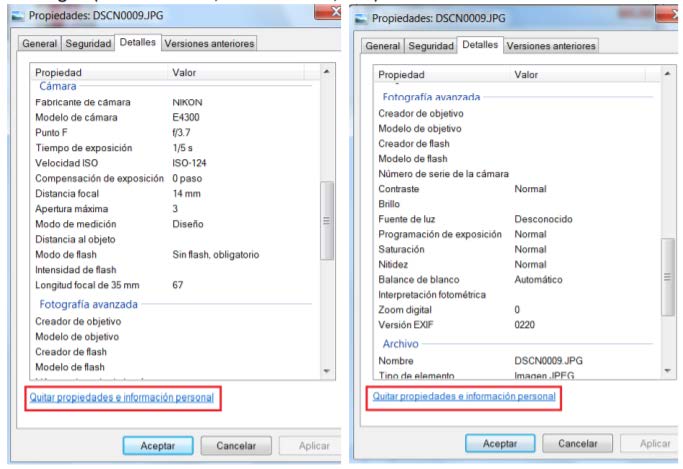
a) Open the file explorer and navigate to the image. On it, press the right mouse button, select Properties and select the Details tab. Windows detects two categories of EXIF metadata: “Camera” and “Advanced Photography”. Then we click on remove properties and personal information.
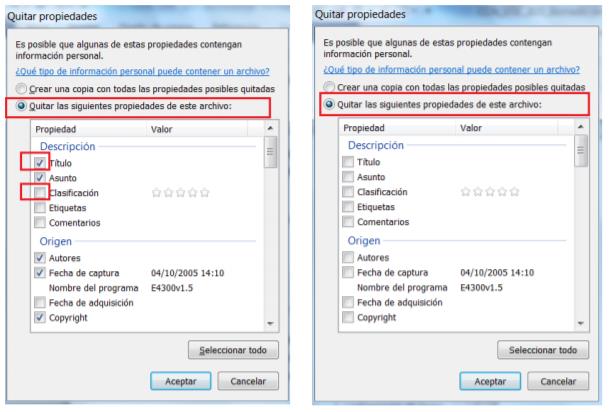
 b) Then a window will appear to select the data that we want to delete (all of them, or a set of them by marking their corresponding check).
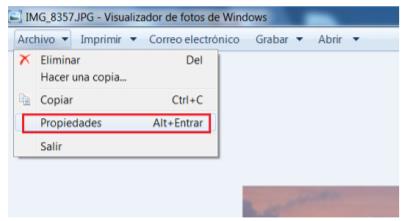
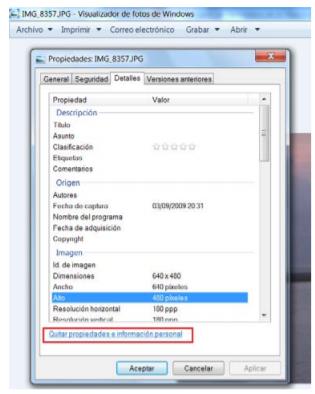
c) Another option is with Windows Photo Viewer. If we open the digital image with the default Windows viewer, by selecting File and then Properties, the same window opens as from the file explorer. It therefore allows you to view and delete the metadata as explained in the previous section.
Before publishing any image on the web, it will be necessary to eliminate the metadata it may contain.