The Software Catalog shows the list of applications centrally acquired by the IT Service and made available to University staff for installation and use on institutional equipment.
From the catalog, users can:
• Consult detailed information about each product.
• Request usage licenses (limited to academic staff, technical and administrative staff, and students).
To request licenses and access specific information, a user account is required.
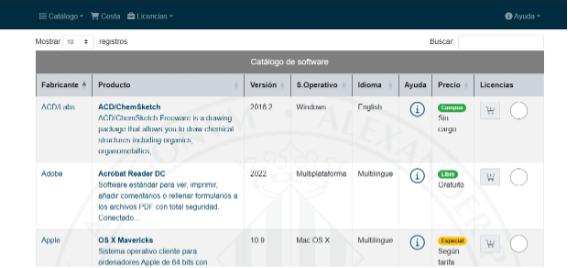
The catalog is presented in table format, with one row for each product available for distribution (that is, those with licenses available).
The first three columns contain icons representing the possible actions:
• Help: displays general information about the product.
• Product sheet: includes all available details.
• Request product: allows the user to start the license request process.
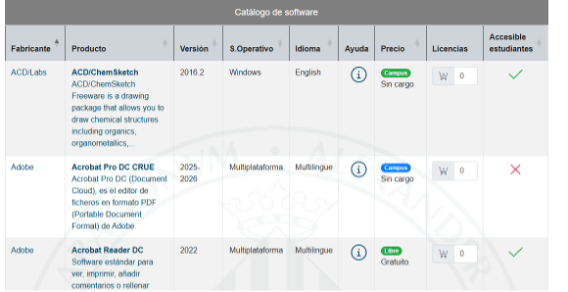
• Product: software name.
• Short description: includes a link to the product help.
• Manufacturer: vendor name, with a link to its website.
• Product type: category (e.g., antivirus, office software).
• Latest version: most recent version available in the distribution system (may differ from the commercial version).
• Other versions: previous versions available.
• Languages: available languages.
• Platforms: supported operating systems.
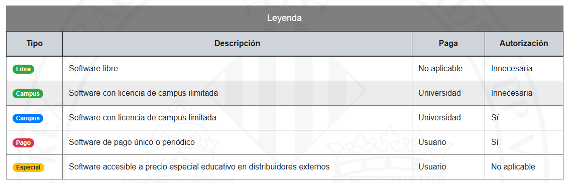
• License type: license model (campus, limited, paid).
• Price: cost per license (if applicable).
• Server folder: visible only to authenticated users with a license; includes an FTP link.
• More information: additional data for licensed users.
• Installation instructions: detailed steps to install the product.
• Product-specific data: information such as serial number or activation code (confidential).
Campus license
• Automatic request from the application.
• If the user already has licenses, a warning is displayed to avoid duplicates.
• Immediate assignment and access to the enabled server.
Limited campus license
• Restricted licenses (e.g., software for Microsoft servers, Apple systems).
• Requires a web form, printing, signing, and submission to the IT Service.
One-time or periodic paid software
• One-time or annual payment.
• Request via web form and a document signed by the user and the budget holder.
• Processing only after receiving the original document without amendments.